Scope
How a Spring Boot service goes from source to a running pod: the executable (fat) jar and its nested
BOOT-INFlayout, layered jars for Docker cache reuse, two ways to build an image (a multi-stage Dockerfile vs Cloud Native Buildpacks), and running well in Kubernetes — JVM container awareness, 12-factor config via 03 - Configuration, Profiles & Externalized Config, liveness/readiness probes wired to 12 - Actuator, Metrics & Observability, and graceful shutdown during rolling deploys. Image-size levers (distroless, jlink, native from 14 - Performance, AOT & Native Images) close the loop.
Related: Spring Boot, 03 - Configuration, Profiles & Externalized Config, 12 - Actuator, Metrics & Observability, 14 - Performance, AOT & Native Images
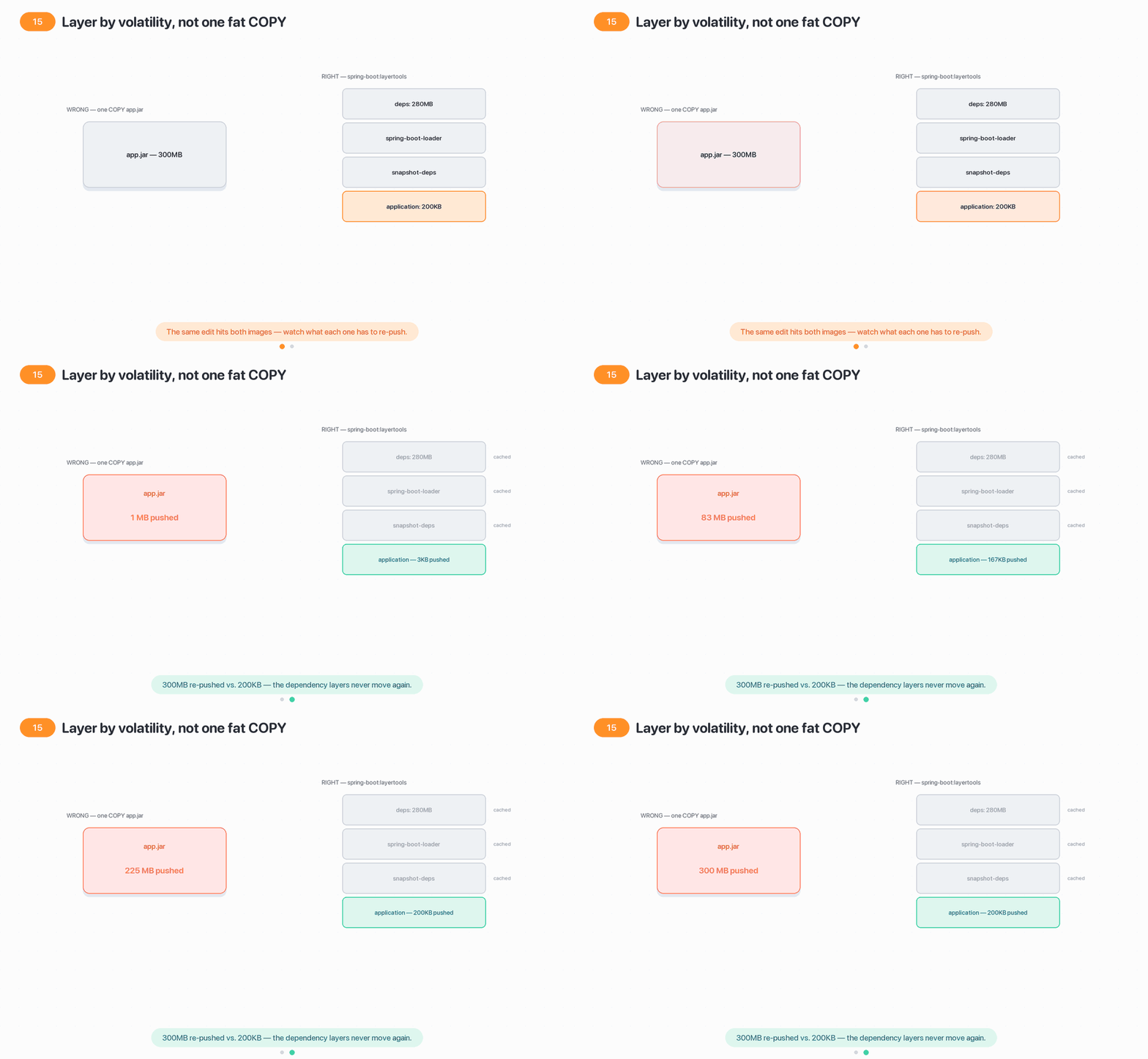
One fat COPY re-pushes the whole jar on every code change; layering by volatility means a one-line edit only re-pushes the application layer — kilobytes, not hundreds of megabytes.
1. The executable (fat) jar: nested layout, not a shaded uber-jar
mvn package (or gradle bootJar) produces a single self-contained jar you run with java -jar app.jar. Its structure is not a flat classpath — it is a nested archive:
app.jar
├── META-INF/
│   └── MANIFEST.MF          # Main-Class + Start-Class (below)
├── org/springframework/boot/loader/launch/   # the loader itself, unpacked
│   └── JarLauncher.class
└── BOOT-INF/
    ├── classes/             # YOUR compiled classes + resources
    ├── lib/                 # every dependency, as its own .jar (nested!)
    └── classpath.idx        # ordered classpath; layers.idx (§2) sits here too
The manifest points the JVM at Boot’s launcher, which sets up a custom classloader that can read jars nested inside the outer jar, then hands off to your main:
Main-Class:  org.springframework.boot.loader.launch.JarLauncher   # HIGH-CHURN: package moved to .loader.launch in Boot 3.2+
Start-Class: com.acme.StoreApplication                            # your real main class
Why nested jars instead of a shaded/uber jar
A shaded (uber) jar explodes every dependency’s classes into one flat namespace. That destroys jar identity — two libraries shipping the same class silently clobber each other,
META-INF/servicesfiles collide, and signed jars break. Boot instead keeps each dependency as an intact jar underBOOT-INF/lib/and teaches itsJarLauncherto load classes from those nested archives. You get one runnable artifact without flattening, so libraries keep their identity, resources, and signatures. This is the single most-probed “what is a fat jar” follow-up.
2. Layered jars: layers.idx and Docker layer caching
By default Boot’s plugins also write a layers.idx into the jar that groups its contents by how often they change — the key to fast, cheap container rebuilds. The four standard layers, ordered least-to-most volatile:
| Layer | Contents | Changes… |
|---|---|---|
dependencies | released third-party jars | rarely (only on a dependency bump) |
spring-boot-loader | the org/springframework/boot/loader classes | almost never |
snapshot-dependencies | -SNAPSHOT jars | occasionally |
application | your BOOT-INF/classes + META-INF | every commit |
You can inspect and unpack these with the built-in tools jar mode (this replaced the old -Djarmode=layertools; verify per version):
java -Djarmode=tools -jar app.jar list-layers          # dependencies / spring-boot-loader / snapshot-dependencies / application
java -Djarmode=tools -jar app.jar extract --layers --destination extracted
Gotcha #1 — copying the whole fat jar into one Docker layer
The naïve
COPY target/app.jar .+ENTRYPOINT ["java","-jar","app.jar"]puts your 300 MB of dependencies and your 200 KB of changed code in a single image layer. Change one line of a controller and Docker invalidates that layer — the entire jar is rebuilt, re-pushed to the registry, and re-pulled by every node. CI slows, registry storage balloons, and rollouts drag while nodes download hundreds of unchanged megabytes.
Mitigation: extract the layers (§3) andCOPYeach into its own image layer. Now a code-only change re-pushes just the tinyapplicationlayer; the dependency layer stays cached across builds and nodes.
3. Building an image #1 — a multi-stage Dockerfile that extracts layers
The recommended hand-rolled approach: a builder stage that extracts the layers, and a slim runtime stage that copies each layer separately so Docker caches them independently.
# ---- Stage 1: extract the layered jar ----
FROM bellsoft/liberica-openjre-debian:17-cds AS builder      # HIGH-CHURN: pin JRE/base per policy
WORKDIR /builder
ARG JAR_FILE=target/*.jar
COPY ${JAR_FILE} application.jar
RUN java -Djarmode=tools -jar application.jar extract --layers --destination extracted

# ---- Stage 2: minimal runtime image ----
FROM bellsoft/liberica-openjre-debian:17-cds
WORKDIR /application
RUN useradd --system --uid 1001 spring                        # §7 — do NOT run as root
USER 1001
# ORDER MATTERS: least-volatile first so the volatile 'application' layer sits on top
COPY --from=builder /builder/extracted/dependencies/ ./
COPY --from=builder /builder/extracted/spring-boot-loader/ ./
COPY --from=builder /builder/extracted/snapshot-dependencies/ ./
COPY --from=builder /builder/extracted/application/ ./
ENTRYPOINT ["java", "-jar", "application.jar"]
Each COPY becomes one image layer; only layers whose inputs changed are rebuilt and re-pushed.
Keep the layer COPY order least-volatile → most-volatile
Docker’s cache is invalidated from the first changed instruction downward. Copy
dependenciesbeforeapplicationso a routine code change only busts the last, smallest layer. Reversing the order defeats the entire point of layering.
4. Building an image #2 — Cloud Native Buildpacks (no Dockerfile)
Boot’s Maven/Gradle plugins can produce an OCI image with zero Dockerfile using Cloud Native Buildpacks (the Paketo buildpacks by default). Buildpacks detect that it’s a JVM app, install a JRE, apply the layered layout, set a non-root user and sensible memory ergonomics, and emit a production-shaped image.
# Maven — builds and tags an OCI image straight to the local Docker daemon
mvn spring-boot:build-image -Dspring-boot.build-image.imageName=registry.acme.io/store:1.4.2

# Gradle equivalent
gradle bootBuildImage --imageName=registry.acme.io/store:1.4.2
<!-- Or configure the plugin so plain `mvn spring-boot:build-image` is enough -->
<plugin>
<groupId>org.springframework.boot</groupId>
<artifactId>spring-boot-maven-plugin</artifactId>
<configuration>
<image>
<name>registry.acme.io/store:${project.version}</name>
<env><BP_JVM_VERSION>17</BP_JVM_VERSION></env> <!-- HIGH-CHURN: JDK baseline -->
</image>
</configuration>
</plugin>Buildpacks give you a hardened image for free
Non-root user, reproducible builds, CVE-patchable base layers, and correct container memory settings all come out of the box — and you never maintain Dockerfile boilerplate.
build-imageneeds a reachable Docker daemon (or a remote builder) in CI. The trade-off: less control over the exact base image than a Dockerfile gives you.
5. Choosing a build strategy: Dockerfile vs Buildpacks vs Jib
| Dockerfile (extracted layers) | Cloud Native Buildpacks (build-image) | Jib (Google plugin) | |
|---|---|---|---|
| Dockerfile required | Yes — you own it | No | No |
| Docker daemon at build | Yes | Yes (or remote builder) | No — talks to registry directly |
| Layer caching | Manual, via extracted layers | Automatic | Automatic |
| Base image control | Full | Limited (builder-defined) | Full (you set base) |
| Non-root / hardening | You configure it | Built-in | You configure it |
| Maintenance burden | Highest | Lowest | Low |
| When to pick which | Custom base, sidecars, OS packages, or strict supply-chain control | Default for most teams — no Docker expertise, batteries-included | Daemon-less CI (no privileged Docker), reproducible builds, tight Maven/Gradle integration |
The committed default
For a typical Spring Boot service in 2026, start with Cloud Native Buildpacks — least to maintain, secure by default. Move to a Dockerfile with extracted layers the moment you need a specific base image, extra OS packages, or CDS/native customization the buildpack doesn’t expose. Reach for Jib when your CI can’t run a Docker daemon and you want daemon-less, reproducible pushes. All three should end up with the same layered structure — the decision is about control and CI shape, not runtime behavior.
6. Jar vs WAR: when a WAR is still the right answer
The executable jar with an embedded server is the default and the right choice for nearly everything containerized. A WAR deployed to an external servlet container still has narrow, legitimate uses.
@SpringBootApplication
public class StoreApplication extends SpringBootServletInitializer {   // WAR entry point
    @Override
    protected SpringApplicationBuilder configure(SpringApplicationBuilder b) {
        return b.sources(StoreApplication.class);
    }
    public static void main(String[] args) { SpringApplication.run(StoreApplication.class, args); }
}
To build a WAR you set <packaging>war</packaging> and mark the embedded server provided so it doesn’t collide with the host container’s servlet runtime.
| Package | Ship it when… |
|---|---|
| Executable jar (default) | containers, Kubernetes, cloud PaaS — anything where you control the process |
| WAR | a mandated shared app server (WebSphere/WildFly/Tomcat) you cannot replace, or corporate ops standards require it |
Gotcha #2 — WAR + WebFlux don't mix
Traditional WAR deployment requires the Servlet API and
SpringBootServletInitializer. A WebFlux app has no hard Servlet dependency and runs on Reactor Netty by default, so it cannot be deployed as a WAR to a servlet container. If you’re reactive, you’re a jar. Don’t try to force it into an app server.
7. Running the JVM in a container: cgroup awareness, CDS, non-root, size
A container is not a VM — the JVM sees the host’s CPUs and RAM unless it respects the cgroup limits. Modern JDKs (17+, our baseline) enable -XX:+UseContainerSupport by default, so the JVM reads the container’s memory/CPU limits — but only if you actually set limits on the pod.
resources:
  requests: { memory: "512Mi", cpu: "250m" }
  limits:   { memory: "512Mi", cpu: "1" }
env:
  - name: JAVA_TOOL_OPTIONS
    value: "-XX:MaxRAMPercentage=75.0 -XX:+UseContainerSupport"   # heap = % of the LIMIT, not the host
Size the heap as a percentage of the container limit (MaxRAMPercentage), leaving headroom for metaspace, thread stacks, and off-heap/native memory. Layer in CDS (or AOT/native from 14 - Performance, AOT & Native Images) baked into the image for faster, cheaper startup — the :*-cds base image in §3 exists for exactly this.
Gotcha #3 — no resource limits → OOMKilled or noisy neighbor
With no
limits,UseContainerSupporthas nothing to read: the JVM sizes its heap off the node’s total RAM, then grows past what the pod is allotted. Kubernetes OOMKills the container (exit 137) with no JVMOutOfMemoryErrorin the logs — it looks like a random crash. Without CPU limits one pod can starve its neighbors on the node.
Mitigation: always setrequestsandlimits; setMaxRAMPercentage(≈75%) so heap tracks the limit with headroom. Watch container memory in 12 - Actuator, Metrics & Observability, not just JVM heap.
Gotcha #4 — running the container as root
The default
USERin most base images is root. A container escape from a root process is a host-level compromise; many clusters reject root containers outright via Pod Security Standards, and your pod won’t even schedule.
Mitigation: create and switch to a non-root user in the Dockerfile (§3), or let Buildpacks do it. Enforce it at the cluster withrunAsNonRoot: trueandreadOnlyRootFilesystem: truein the podsecurityContext.
Image size levers, smallest-effort first: unpack + layer (§2) → a slim JRE base → distroless (no shell/package manager, smaller attack surface) → jlink a custom minimal runtime → a GraalVM native image (tens of MB, sub-second start; see 14 - Performance, AOT & Native Images).
8. 12-factor config in Kubernetes: env vars, ConfigMap & Secret
Follow twelve-factor: config lives in the environment, never in the image. Spring Boot binds relaxed environment variables automatically (SPRING_DATASOURCE_URL → spring.datasource.url), and — importantly — can import mounted config files directly via spring.config.import (see 03 - Configuration, Profiles & Externalized Config).
# ConfigMap mounted as files, Secret injected as env — consumed by spring.config.import
spec:
  containers:
    - name: store
      envFrom:
        - secretRef: { name: store-secrets }      # DB password, API keys → env
      env:
        - name: SPRING_PROFILES_ACTIVE
          value: "prod,k8s"
        - name: SPRING_CONFIG_IMPORT
          value: "optional:configtree:/etc/config/"   # mounted ConfigMap tree
      volumeMounts:
        - { name: app-config, mountPath: /etc/config, readOnly: true }
  volumes:
    - name: app-config
      configMap: { name: store-config }
The profile-specific application-prod.yml / application-k8s.yml files still apply, so environment differences stay in profiles (03 - Configuration, Profiles & Externalized Config) while secrets stay in the Secret.
Gotcha #5 — baking config or secrets INTO the image
Hard-coding
application-prod.yml(or worse, credentials) into the image breaks 12-factor and is a security incident waiting to happen: the same image can no longer promote unchanged dev → staging → prod, and anyone who pulls the image reads your secrets from the layers (they persist in history even if a later layer “deletes” the file).
Mitigation: build one image, configure it per environment with env vars / ConfigMap / Secret. Keep secrets in aSecret(ideally backed by Vault or a cloud secrets manager), never in the image or in git.
9. Liveness & readiness probes wired to Actuator health groups
Boot exposes two Actuator health groups designed for Kubernetes — driven by the application availability state, not by a generic “is the port open” check (12 - Actuator, Metrics & Observability).
| Probe | Endpoint | Asks | On failure Kubernetes… |
|---|---|---|---|
| Liveness | /actuator/health/liveness | ”Is the app broken beyond recovery?” (LivenessState) | restarts the pod |
| Readiness | /actuator/health/readiness | ”Can it accept traffic right now?” (ReadinessState) | removes it from Service endpoints |
management.endpoint.health.probes.enabled=true        # auto-on when Kubernetes is detected
management.endpoint.health.group.readiness.include=readinessState,db,redis # readiness = real dependencieslivenessProbe:
httpGet: { path: /actuator/health/liveness, port: 8080 }
failureThreshold: 3
periodSeconds: 10
readinessProbe:
httpGet: { path: /actuator/health/readiness, port: 8080 }
failureThreshold: 3
periodSeconds: 5Gotcha #6 — no readiness probe → traffic to a not-ready pod
Without a readiness probe, Kubernetes adds a pod to the Service the instant its container process starts — before the context has refreshed, caches are warm, or the DB pool is up. During a rolling deploy, requests route to that pod and fail with connection errors or 500s, and users see a blip on every deployment.
Mitigation: always define both probes. Put real dependency checks in the readiness group (DB, broker) so a pod only takes traffic once it can serve it; keep liveness cheap and dependency-free so a transient DB blip doesn’t trigger a pointless restart storm.
Don't conflate liveness and readiness
A failed liveness probe restarts the pod; a failed readiness probe just pauses traffic. Putting a database check in the liveness group means a DB outage restarts every pod in a loop — turning a recoverable dependency blip into a full outage. Liveness = “am I deadlocked?”, readiness = “should I get traffic?“.
10. Graceful shutdown & the preStop hook during rolling deploys
Graceful shutdown lets in-flight requests finish before the process exits — enabled by default on the embedded servers, tuned by two properties:
server.shutdown=graceful                              # default; finish in-flight, refuse new
spring.lifecycle.timeout-per-shutdown-phase=30s       # grace window before force-close
But there’s a race in Kubernetes: when a pod is deleted, the kubelet sends SIGTERM and the endpoints controller removes it from the Service concurrently. For a brief window the app is shutting down while the Service may still route to it. The fix is a preStop hook that delays SIGTERM long enough for endpoint removal to propagate:
lifecycle:
  preStop:
    exec: { command: ["sh", "-c", "sleep 10"] }       # let endpoint de-registration propagate first
terminationGracePeriodSeconds: 45                       # must exceed preStop + shutdown timeout
Order the shutdown so no request is dropped
Sequence: readiness flips to
REFUSING_TRAFFIC→preStop sleepdrains the Service endpoints →SIGTERMtriggers Boot’s graceful shutdown → in-flight requests complete → process exits. SetterminationGracePeriodSecondsgreater thanpreStop+timeout-per-shutdown-phase, or Kubernetes SIGKILLs mid-request and you drop connections on every rollout.
11. Caveats & risk mitigation (summary)
- Always layer the image (§2–3). Copy least-volatile → most-volatile; a code change should re-push kilobytes, not hundreds of megabytes.
- One image, many environments (§8). Config and secrets come from env/ConfigMap/Secret via
spring.config.importand profiles — never baked in. - Set resource limits (§7). No limits → the JVM mis-sizes heap → OOMKilled.
MaxRAMPercentage≈ 75% with headroom. - Never run as root (§7). Non-root user in the image; enforce
runAsNonRootat the cluster. - Both probes, correctly scoped (§9). Readiness = real dependencies (drains traffic); liveness = cheap (restarts). Never swap them.
- Graceful shutdown + preStop (§10). Drain endpoints before SIGTERM; size
terminationGracePeriodSecondsto cover the full drain. - Version facts are volatile. Boot 4.1.x / Framework 7 / Jakarta EE 11 / JDK 17 baseline,
toolsjarmode, loader package…loader.launch, and base-image tags are current as of mid-2026 — re-verify before relying on them.
12. In practice
# Production-shaped image: extracted layers + non-root + CDS base (§3, §7)
FROM bellsoft/liberica-openjre-debian:17-cds AS builder
WORKDIR /b
COPY target/*.jar app.jar
RUN java -Djarmode=tools -jar app.jar extract --layers --destination x
FROM bellsoft/liberica-openjre-debian:17-cds
WORKDIR /app
RUN useradd --system --uid 1001 spring
USER 1001
COPY --from=builder /b/x/dependencies/ ./
COPY --from=builder /b/x/spring-boot-loader/ ./
COPY --from=builder /b/x/snapshot-dependencies/ ./
COPY --from=builder /b/x/application/ ./
ENTRYPOINT ["java","-XX:MaxRAMPercentage=75.0","-jar","application.jar"]
# The pod that runs it right (§7–10)
spec:
securityContext: { runAsNonRoot: true }
terminationGracePeriodSeconds: 45
containers:
- name: store
image: registry.acme.io/store:1.4.2
resources:
requests: { memory: 512Mi, cpu: 250m }
limits: { memory: 512Mi, cpu: "1" }
env:
- { name: SPRING_PROFILES_ACTIVE, value: "prod,k8s" }
envFrom:
- secretRef: { name: store-secrets }
readinessProbe: { httpGet: { path: /actuator/health/readiness, port: 8080 } }
livenessProbe: { httpGet: { path: /actuator/health/liveness, port: 8080 } }
lifecycle: { preStop: { exec: { command: ["sh","-c","sleep 10"] } } }Interview talking points to be able to defend:
- “A Boot fat jar keeps each dependency as an intact nested jar under
BOOT-INF/lib— it’s not a shaded uber-jar, so library identity, resources, and signatures survive.” - “Layered jars split contents by volatility so a code change re-pushes only the tiny
applicationlayer, not the whole dependency set.” - “For most teams I default to Buildpacks (
build-image) for a hardened image with no Dockerfile; I switch to a Dockerfile with extracted layers when I need base-image control, and Jib for daemon-less CI.” - “One image promotes across environments; config and secrets come from env/ConfigMap/Secret via
spring.config.importand profiles — never baked into the image.” - “In containers I set resource limits and
MaxRAMPercentageso the JVM respects the cgroup, run non-root, and size the heap off the limit — no limits means OOMKilled.” - “Readiness (real dependencies) drains traffic; liveness (cheap) restarts. I add a
preStopsleep so endpoints de-register before SIGTERM, and sizeterminationGracePeriodSecondsto cover graceful shutdown.”
13. Sources
- Spring Boot Reference — The Executable Jar Format (nested jars, JarLauncher)
- Spring Boot Reference — Efficient Container Images & the layer index (
layers.idx) - Spring Boot Reference — Dockerfiles (jarmode tools, multi-stage layer extraction)
- Spring Boot Reference — Cloud Native Buildpacks (
build-image/bootBuildImage) - Spring Boot Maven Plugin — Packaging OCI Images (
build-imagegoal) - Spring Boot How-to — Traditional (WAR) Deployment
- Spring Boot Reference — Kubernetes Probes & health groups (liveness/readiness)
- Spring Boot Reference — Graceful Shutdown
- Spring Boot Reference — Container Images (overview)
- Spring Boot 4.0.0 available now (GA announcement, 2025-11-20)