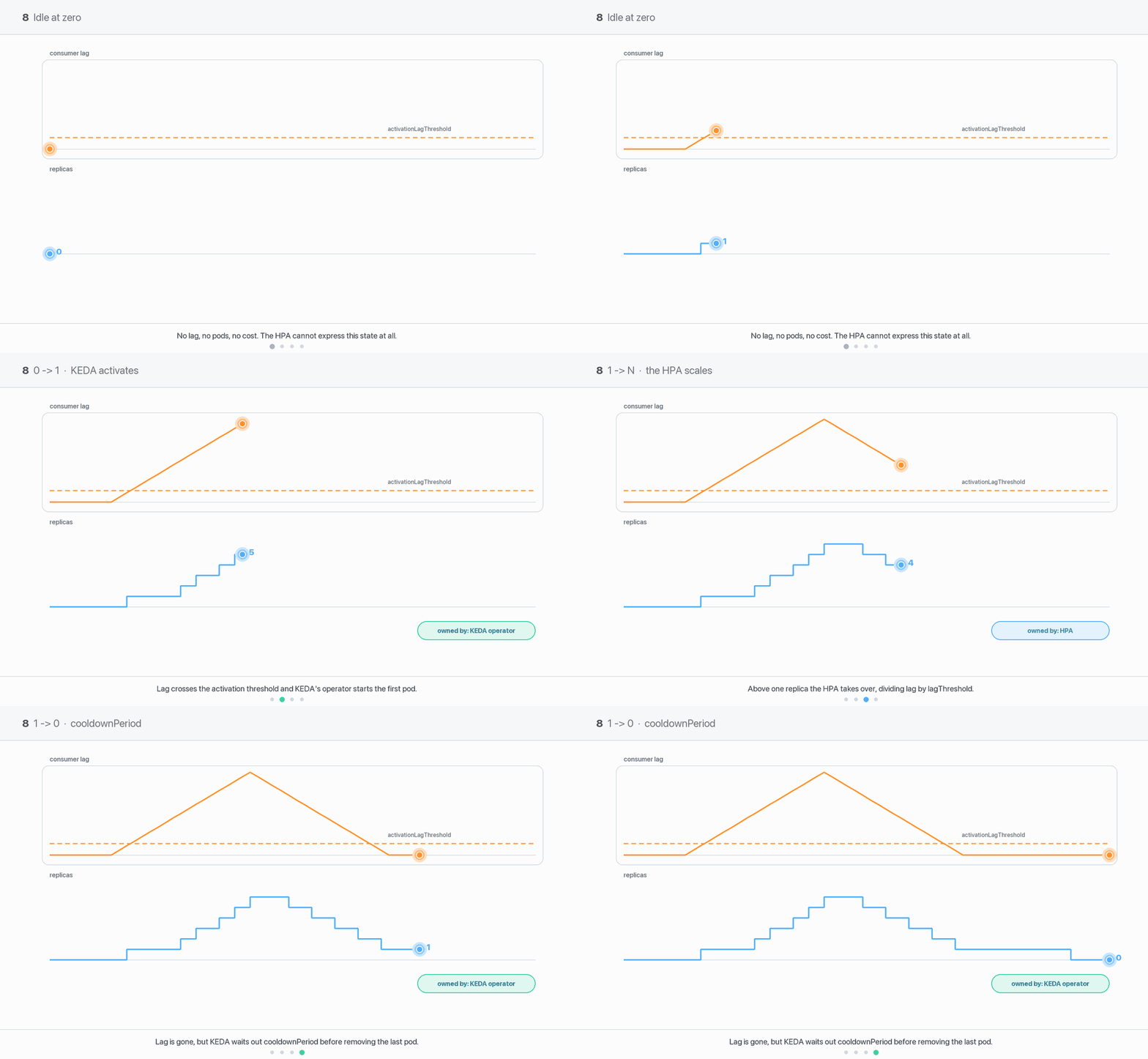
The boundary KEDA exists to handle: running no pods at all and waking up when work arrives. Two ideas carry the whole module. First, 0↔1 and 1↔N are handled by different components with different rules — mix them up and nothing about scale-to-zero makes sense. Second, scaling to zero is a trade, not a free win: you pay in cold-start latency and in Kafka’s willingness to forget where your consumer group was. Builds on 07 - The Kafka Scaler — Every Field & the Replica Math and the ownership split in 03 - KEDA Architecture — Operator, Metrics Adapter & the HPA It Owns.
Written against KEDA v2.20 · Kubernetes 1.33–1.35 · Apache Kafka 4.3
Field names and defaults below are current for v2.20. KEDA’s CRDs are v1alpha1 and breaking changes ship in minor releases — re-check against the ScaledObject spec for the version you actually run.
1. Two phases, two owners
A KEDA-managed workload lives in one of two regimes, and different software is in charge of each.
the operator writes the scale subresource directly
the HPA writes it
KEDA’s own documentation draws the same line:
“The activating (or deactivating) phase is the moment when KEDA (operator) has to decide if the workload should be scaled from/to zero. The scaling phase is the moment when KEDA has decided to scale out to 1 instance and now it is the HPA controller who takes the scaling decisions.”
The reason the split exists at all is a Kubernetes limitation: an HPA’s minReplicas cannot be 0 outside an alpha feature gate that has been alpha since 1.16. So KEDA leaves the HPA with minReplicas: 1 and takes the zero boundary for itself. Full mechanics in 03 - KEDA Architecture — Operator, Metrics Adapter & the HPA It Owns.
The diagnostic habit worth building
When something looks wrong, the first question is never “which field is wrong” — it’s which transition am I actually looking at? “It won’t scale down past 1” is an HPA question. “It won’t scale down past 1 to 0” is a KEDA question. Different owners, different knobs, and a fix aimed at the wrong one does nothing at all.
2. Two thresholds, two different jobs
The Kafka trigger takes two lag numbers, and they are not two settings for the same thing.
triggers:- type: kafka metadata: bootstrapServers: kafka-0.kafka.lab.svc.cluster.local:9092 consumerGroup: orders-workers topic: orders lagThreshold: "500" # → the HPA's arithmetic: how many pods once running activationLagThreshold: "20" # → only: is there enough work to wake up at all?
activationLagThreshold is evaluated inside the KEDA operator and produces a single boolean. It has no say in how many pods you end up with. Its default is 0, which means “any lag at all wakes the workload.”
Two details about it cause real confusion.
The comparison is strictly greater than. Lag must exceedactivationLagThreshold, not merely equal it. With activationLagThreshold: 20 a total lag of exactly 20 leaves the workload asleep; 21 wakes it. KEDA’s docs say so explicitly: activation “only occurs when this value is greater than the set value; not greater than or equal to.” If you want “wake on ten messages,” write 9.
If minReplicaCount >= 1, the activation value is ignored entirely. With a floor of one or more pods there is no zero boundary to cross, so the scaler is treated as permanently active and activationLagThreshold is dead configuration.
Gotcha — tuning activationLagThreshold on a workload that never idles
This is a genuinely common waste of an afternoon: someone sets minReplicaCount: 1 (sensibly), then tries to change when the workload becomes busy by adjusting activationLagThreshold, and nothing happens no matter what value they use. The field is not being ignored because of a bug — it is being ignored because the workload is always considered active. Mitigation:activationLagThreshold only has meaning when minReplicaCount is 0 (or unset, since the default is 0). If you want to change behaviour at low lag on an always-on workload, the knob is lagThreshold plus the HPA’s scale-up policies (10 - Tuning Scaling Behaviour).
3. minReplicaCount vs idleReplicaCount — the warm-pool pattern
Three fields describe the bottom of the range, and the third one is the interesting one.
Field
Default
Meaning
minReplicaCount
0
the floor the HPA scales within, and the count KEDA activates to
maxReplicaCount
100
the ceiling
idleReplicaCount
unset (disabled)
the count to drop to when there is no work, below minReplicaCount
Without idleReplicaCount, minReplicaCount does double duty: it is both “the fewest pods while working” and “the count you idle at.” Setting them separately splits those apart:
spec:
  idleReplicaCount: 0     # when there is no work at all: zero pods
  minReplicaCount: 5      # the instant work appears: five pods, immediately
  maxReplicaCount: 12
Idle costs nothing. The first event that clears activationLagThreshold doesn’t bring up one pod and then wait for the HPA to notice a backlog — it brings up five at once. This is the warm-pool pattern: no standing cost, but no single-pod bottleneck at the front of a burst either. It suits workloads that go from nothing to a lot with no ramp — a nightly batch drop, a scheduled export, a queue that fills in seconds.
Gotcha — only 0 is supported for idleReplicaCount
KEDA’s docs are blunt: “Due to limitations in HPA controller the only supported value for this property is 0.” You cannot idle at 2 and work at 8. It must also be less than minReplicaCount, and the admission webhook rejects the object if it isn’t — you’ll get a validation error naming both values rather than a silently wrong config. Mitigation: treat idleReplicaCount as a boolean spelled 0 — “idle all the way down, then jump to minReplicaCount.” If you need a genuine floor above zero, that is just minReplicaCount on its own with no idleReplicaCount.
4. cooldownPeriod governs ONLY the final step to zero
State this plainly, early, because it is the most misunderstood knob in KEDA:
cooldownPeriod does not slow down ordinary scale-down
cooldownPeriod (default 300 s) is the quiet time KEDA waits, after the trigger last reported activity, before it takes the workload to zero (or to idleReplicaCount). That is all it does. Scaling from 12 pods to 1 is entirely the HPA’s business and is governed by behavior.scaleDown.stabilizationWindowSeconds (Kubernetes default 300 s). The KEDA docs say it outright: “the KEDA cooldownPeriod only applies when scaling to 0; scaling from 1 to N replicas is handled by the Kubernetes Horizontal Pod Autoscaler.”
So the mapping is:
Symptom
The knob that actually governs it
Sits at 12 pods long after the backlog cleared
HPA behavior.scaleDown.stabilizationWindowSeconds
Flaps between 4 and 6 pods
HPA behavior.scaleUp / scaleDown policies and windows
Reaches 1 pod quickly, then sits at 1 for five minutes
KEDA cooldownPeriod
Wakes from zero slowly
pollingInterval (KEDA only checks every 30 s by default)
People discover the 5-minute pause at the end and reach for cooldownPeriod to fix the whole scale-down curve. It has no effect above 1. Full treatment of the timing knobs is in 10 - Tuning Scaling Behaviour.
initialCooldownPeriod (default 0) covers a different case: a workload that has never been active. When there is no record of past activity, cooldownPeriod has nothing to measure from, so KEDA measures initialCooldownPeriod from the ScaledObject’s creation time instead. With the default of 0, a freshly created ScaledObject over an empty topic is taken to zero almost immediately.
Best practice — set initialCooldownPeriod during a rollout
Deploying a consumer and its ScaledObject together with an empty topic means KEDA can scale the brand-new Deployment to zero before it has ever processed anything. Harmless if you trust the config; alarming during a first rollout, and it makes smoke-testing awkward. Set initialCooldownPeriod: 300 so a new workload gets a grace period to prove itself, and leave the steady-state cooldownPeriod to govern everything afterwards.
5. The invalid-offset problem — lag when there is no offset
Lag is “log end minus committed offset.” A brand-new consumer group has never committed anything, so there is no committed offset and lag is genuinely undefined. Kafka reports it as -:
GROUP          TOPIC   PARTITION  CURRENT-OFFSET  LOG-END-OFFSET  LAG
orders-workers orders  0          -               3827            -      <- never consumed
orders-workers orders  3          3526            3526            0      <- caught up
orders-workers orders  5          1248            2881            1633   <- working
KEDA has to substitute something for those - rows, and two fields decide what:
offsetResetPolicy
scaleToZeroOnInvalidOffset
Lag reported per uncommitted partition
Effect at zero replicas
latest (default)
false (default)
1 — a placeholder
wakes up and keeps one consumer alive
latest
true
0
stays at zero
earliest
false (default)
the whole log (the end offset)
wakes up, scales to process everything
earliest
true
0
stays at zero
The default pair — latest + false — is deliberately conservative: a small placeholder lag per partition keeps at least one consumer running so that the group can join, be assigned partitions, and start committing. This is also why a fresh 12-partition topic reports a total lag of 12 rather than 0.
scaleToZeroOnInvalidOffset: true exists for the opposite preference: “if I have no idea where this group is, do nothing.” That preference has a sharp edge.
Gotcha — scaleToZeroOnInvalidOffset: true can deadlock a new consumer group
On a brand-new group with offsetResetPolicy: latest, every partition reports lag 0, so KEDA never activates the workload. No pods means no consumer, no consumer means no committed offset, and no committed offset means the lag stays 0 forever. It never starts, so it never commits, so it never starts. The workload appears perfectly healthy — Ready=True, no errors, zero replicas — and processes nothing, indefinitely. Mitigation: leave scaleToZeroOnInvalidOffset at its default false on any group that might be new. If you do want it true (usually to stop stale groups pinning a pod), seed the offsets first: run the consumer once at minReplicaCount: 1 until kafka-consumer-groups.sh --describe shows a number in CURRENT-OFFSET for every partition, then switch it on.
And the sibling trap, which is really the same shape: a consumer that never commits at all combined with minReplicaCount: 0 is, in KEDA’s own words about this situation, “effectively disabled.” KEDA reads committed offsets; if nothing is ever committed, the signal never changes. You’ll break this on purpose in 09 - LAB 3 — Break It on Purpose.
6. Losing your offsets while scaled to zero
This one is a Kafka behaviour, not a KEDA behaviour, and it is the most under-appreciated cost of scale-to-zero.
Kafka expires a consumer group’s committed offsets after offsets.retention.minutes, whose default is 10080 — 7 days. Crucially, the clock does not start when the offsets were written. It starts when the group becomes empty, i.e. when it loses its last member. Which is precisely what scaling to zero does.
So the sequence is:
Traffic stops. KEDA takes the workload to zero after cooldownPeriod.
The consumer group now has no members. Kafka starts a 7-day timer.
Nothing happens for eight days.
A message arrives. KEDA wakes the workload. The consumer joins — and there are no committed offsets any more.
Its position is re-derived from auto.offset.reset: with earliest it replays the entire retained log; with latest it skips the entire backlog, including the message that woke it.
Neither outcome is subtle. A replay means duplicate processing at whatever scale KEDA computes from a suddenly enormous lag figure; a skip means silent data loss for anything produced during the idle window.
Gotcha — a workload idle for more than a week comes back with amnesia
The failure is invisible while it’s incubating: there is nothing to alert on, no error, and the ScaledObject looks fine. It surfaces once, weeks later, as either a flood of reprocessed events or a hole in your data — and because the trigger was “we were idle for a while,” it reproduces poorly and gets blamed on something else. Mitigation: pick one deliberately. (a) Raise offsets.retention.minutes on the broker for groups that are bursty but rare — a monthly batch consumer needs far more than 7 days. (b) Keep minReplicaCount: 1 for anything that can plausibly be idle for days; one pod holding group membership stops the clock entirely, and that is usually the cheapest fix. (c) Accept it and design for it: make processing idempotent and pin the reset policy to whichever failure you can survive.
The rule of thumb
Scale-to-zero is safe for workloads that idle for minutes to hours. Once “idle” is measured in days, one warm replica is the better engineering choice — you are trading a few millicores for the guarantee that your consumer knows where it was.
7. Why a transactional or compacted topic may never reach zero
A workload can be configured perfectly for zero and still never get there, because lag counts positions in the log, not messages you can consume:
Transaction markers. Kafka transactions write control records into the topic. They are never delivered to your application, but they are real entries in the log and they occupy offsets. Each idle transaction leaves the committed offset one behind the end.
Compaction. Log compaction removes superseded records but leaves their offsets valid as positions. A compacted topic can report lag for offsets whose messages no longer exist.
In-flight transactions. A read_committed consumer cannot read past the last stable offset, so an open transaction on the producer side holds the readable end below the log end for everyone.
The result is a permanent lag floor of roughly one per partition. On a 12-partition topic, a fully drained consumer group still reports around 12. With activationLagThreshold: 0 — the default — 12 is greater than 0, so the trigger is active, so the workload is awake. Forever. Active=True, one pod running, zero messages processed, and the bill arriving monthly.
Gotcha — activationLagThreshold: 0 on a transactional or compacted topic never deactivates
The config looks correct and the arithmetic is correct; the assumption “drained means lag 0” is what’s wrong. You will also see this on a topic that is fine but has partitions your group has never committed to — the placeholder lag from §5 behaves identically. Mitigation:measure the floor, don’t guess it. Drain the topic completely, wait a couple of polling intervals, and read what KEDA still reports:
kubectl -n lab get scaledobject orders-so -o jsonpath='{.status.externalMetricNames}'kubectl get --raw "/apis/external.metrics.k8s.io/v1beta1/namespaces/lab/s0-kafka-orders?labelSelector=scaledobject.keda.sh/name=orders-so" | jq
Then set activationLagThreshold above that number. Around the partition count is the right starting point — for a 12-partition topic, activationLagThreshold: "20" gives headroom without being so high that real work is ignored. Never 0 or 1 on a transactional or compacted topic.
8. The real cost of scaling to zero
Zero pods is not free. It is a latency and observability trade, and it is worth naming the costs explicitly rather than discovering them.
Cold-start latency is the sum of a surprisingly long chain, and every link is real:
Step
Typical contribution
KEDA notices the lag
up to one pollingInterval (default 30 s)
Pod scheduled, node capacity found
seconds — or tens of seconds to minutes if a node must be provisioned by Cluster Autoscaler/Karpenter
Image pull
zero if cached, tens of seconds if not
Runtime start-up
JVM start plus framework context can be 10–40 s; a Python or Go consumer, under a second
For a JVM consumer on a cluster that also has to add a node, “first message processed” can be well over a minute after the message landed. If your SLO is “events are processed within 10 seconds,” scale-to-zero has already failed and no amount of tuning fixes it.
You also stop learning about failures. A broken consumer at zero replicas is indistinguishable from a healthy idle one. Bad credentials, a missing image, a config regression, an unschedulable pod spec — none of it shows up until traffic arrives, which is exactly the moment you least want to find out. A workload with one warm replica fails loudly at deploy time.
And the pollingInterval trade cuts both ways. Lowering pollingInterval to shrink wake-up latency means more broker queries per ScaledObject, all the time, whether or not there is work.
The honest alternatives
Approach
Cost while idle
Wake-up latency
Offsets safe when idle for days?
Choose it when
Scale to zero (minReplicaCount: 0)
none
full cold start, up to pollingInterval + scheduling + warm-up
❌ 7-day expiry clock runs
traffic is genuinely spiky with long true-idle gaps, latency tolerance is minutes, and idle periods are shorter than the offset retention
minReplicaCount: 1
one pod
none — the consumer is already joined and assigned
✅ group never empties
anything latency-sensitive, anything that can be idle for days, and anything whose failure you want to hear about at deploy time
Idle pool (idleReplicaCount: 0 + minReplicaCount: N)
none
one cold start, but N pods arrive together
❌ same expiry clock as zero
bursts arrive all at once with no ramp — scheduled batches, nightly drops — and one pod at the front would be the bottleneck
Committed recommendation
Scale to zero for work that is genuinely spiky and latency-tolerant — nightly reports, on-demand exports, dev and staging environments, anything where a minute of wake-up is invisible to the user. The cost saving there is real and the risks above are all manageable. Keep minReplicaCount: 1 for anything latency-sensitive, or anything used rarely but urgently. One pod is cheap; a cold start on the one request that mattered is not. The “rarely but urgently” case is the one people get wrong most often — a low-traffic consumer looks like the perfect scale-to-zero candidate right up to the incident where it needed to respond in five seconds.
If you cannot decide, start at minReplicaCount: 1, measure how much time the workload actually spends idle, and only go to zero if the number justifies it.
9. More gotchas that cause real incidents
Deleting a ScaledObject while scaled to zero leaves the workload at zero
KEDA does not restore the original replica count on delete unless you opted in with spec.advanced.restoreToOriginalReplicaCount: true (default false). So the natural incident-response instinct — “autoscaling is misbehaving, delete the ScaledObject and stabilise manually” — leaves a Deployment sitting at replicas: 0 with nothing left to bring it back. The HPA is garbage-collected along with the ScaledObject, so nothing is watching any more. Mitigation: to disable autoscaling temporarily, pause instead of deleting — the autoscaling.keda.sh/paused-replicas: "<n>" annotation holds the workload at a fixed count under KEDA’s management. If you must delete, kubectl scale the Deployment back up in the same breath, and consider setting restoreToOriginalReplicaCount: true up front.
A consumer that never commits plus minReplicaCount: 0 is effectively disabled
KEDA reads committed offsets. A consumer group with no commits and no floor has a signal that never moves, so nothing ever activates it. This is the same deadlock shape as §5’s scaleToZeroOnInvalidOffset trap, arriving via a consumer bug instead of a config choice. Mitigation: verify with kafka-consumer-groups.sh --describe that CURRENT-OFFSET advances during normal operation, and keep the commit interval well below pollingInterval so KEDA sees progress between polls. Until commits work, minReplicaCount: 1.
Expecting cooldownPeriod to fix N→1 flapping
Repeated because it is the single most common wasted change in KEDA tuning: raising cooldownPeriod from 300 to 900 to stop a workload oscillating between 3 and 7 pods changes nothing, because no transition in that range is KEDA’s to make. Mitigation: the fix is on the HPA — advanced.horizontalPodAutoscalerConfig.behavior.scaleDown.stabilizationWindowSeconds and the scale-down policies — plus a lagThreshold sized to one pod’s work per polling interval so the computed count stops jittering. See 10 - Tuning Scaling Behaviour.
Fallback and zero interact deliberately
When spec.fallback is configured and a scaler is failing, KEDA avoids taking the workload to zero. That is intentional: at zero replicas the HPA cannot subsequently scale up to fallback.replicas, so scaling to zero during a broker outage would strand the workload. Useful to know before you conclude that scale-to-zero is “broken” during an incident. Mitigation: none needed — this is the desired behaviour. Just recognise it: “won’t go to zero while a trigger is erroring” is correct, and the thing to fix is the trigger. See 11 - Multiple Triggers, Scaling Modifiers & Fallback.
10. Putting it together
A workload that genuinely should idle at zero, on a 12-partition topic:
apiVersion: keda.sh/v1alpha1kind: ScaledObjectmetadata: name: orders-consumerspec: scaleTargetRef: name: orders-consumer pollingInterval: 30 # also your worst-case wake-up delay initialCooldownPeriod: 300 # don't zero a brand-new workload immediately cooldownPeriod: 300 # quiet time before the FINAL step to zero minReplicaCount: 0 # activation is in play (would be ignored if >= 1) maxReplicaCount: 12 # = partition count advanced: restoreToOriginalReplicaCount: true # deleting the SO won't leave you at 0 triggers: - type: kafka metadata: bootstrapServers: kafka-bootstrap.kafka:9092 consumerGroup: orders-processor topic: orders lagThreshold: "500" # HPA arithmetic activationLagThreshold: "20" # above the measured idle floor offsetResetPolicy: earliest # must match the consumer's auto.offset.reset
And the same workload if it is latency-sensitive — note that activationLagThreshold is deliberately absent, because it would be ignored:
spec:
  minReplicaCount: 1           # one warm consumer: no cold start, offsets never expire
  maxReplicaCount: 12
  triggers:
  - type: kafka
    metadata:
      bootstrapServers: kafka-bootstrap.kafka:9092
      consumerGroup: orders-processor
      topic: orders
      lagThreshold: "500"
      offsetResetPolicy: earliest
The rules worth internalising
0↔1 is KEDA’s; 1↔N is the HPA’s. Identify the transition before you touch a field.
activationLagThreshold decides whether; lagThreshold decides how many.
Activation is strictly greater than the threshold, and it is ignored when minReplicaCount >= 1.
cooldownPeriod governs only the last step to zero. Nothing else.
Measure the topic’s idle lag floor and set activationLagThreshold above it — start near the partition count.
Leave scaleToZeroOnInvalidOffset: false unless the group’s offsets are already seeded.
If a workload can be idle for days, either raise offsets.retention.minutes or keep one warm replica.
Set restoreToOriginalReplicaCount: true, or never delete a ScaledObject while it’s at zero.
Latency-sensitive means minReplicaCount: 1. Zero is for spiky and patient work.
Try it
09 - LAB 3 — Break It on Purpose reproduces the never-reaches-zero case and the non-committing-consumer deadlock on your laptop, so you can see the Active condition and the reported metric with your own eyes.
11. Questions you should be able to answer
Who performs the 0→1 transition, and who performs 4→7? (The KEDA operator; the HPA controller.)
Total lag is exactly 20 and activationLagThreshold is 20. Does the workload wake? (No — the comparison is strictly greater than.)
You set activationLagThreshold: 100 and nothing changes. What’s the most likely reason? (minReplicaCount >= 1, so the activation value is ignored.)
What does cooldownPeriod: 600 do to a workload scaling from 10 pods to 2? (Nothing. It only governs the final step to zero.)
What does idleReplicaCount: 0 with minReplicaCount: 5 achieve? (Idles at zero, then jumps straight to five on the first event — a warm pool.)
A brand-new consumer group with latest and scaleToZeroOnInvalidOffset: true never starts. Why? (No offsets → lag 0 → no activation → no consumer → still no offsets. A deadlock.)
A workload idle for nine days wakes up and reprocesses everything. What happened? (Kafka expired the group’s committed offsets after offsets.retention.minutes, counted from when the group emptied, and the position was re-derived from earliest.)
Your drained 12-partition transactional topic reports lag 12 and the workload never sleeps. Fix? (Set activationLagThreshold above the marker floor — around the partition count.)
You deleted a misbehaving ScaledObject while it was at zero and the service stayed down. Why? (Replicas aren’t restored unless restoreToOriginalReplicaCount: true.)
Name three costs of scaling to zero. (Cold-start latency; offset expiry while the group is empty; failures stay hidden until traffic arrives.)