Scope
MCP is an open protocol that standardizes how LLM applications connect to external tools, data, and prompts — the “USB-C port for AI”. This note covers what it is and why (the N×M → N+M integration problem), its host/client/server architecture and primitives, transports, the current 2025-11-25 spec (OAuth 2.1 for remote servers), governance under the Linux Foundation, how it differs from plain function calling, minimal consume/expose examples, and the security model (tool poisoning, prompt injection, confused deputy, the lethal trifecta). For the lower-level mechanics of how a model emits a tool call in the first place, see 04 - Structured Output & Tool Calling; for where MCP fits in an agent loop, see 08 - Agents & Agentic Systems.
Related: Gen AI Engineer, 04 - Structured Output & Tool Calling, 08 - Agents & Agentic Systems, 14 - Safety, Security & Risk
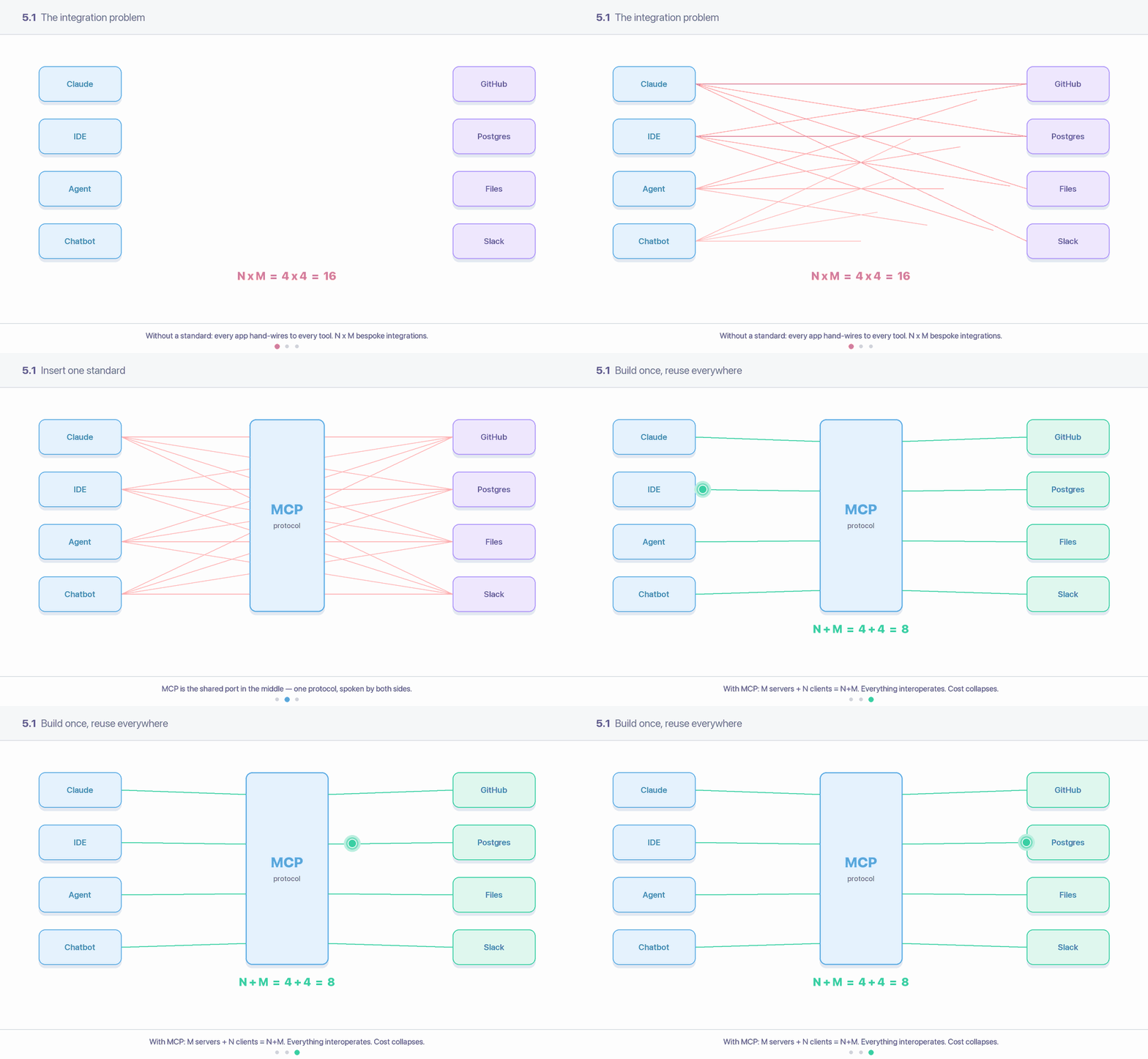
Without a standard, every app hand-wires to every tool — N × M bespoke integrations. MCP inserts one shared protocol in the middle, collapsing the cost to N + M.
1. The concept: a standard port, not another bespoke integration
Function calling (covered in 04 - Structured Output & Tool Calling) lets a model request a tool. But every app still wires each tool to each model by hand: custom glue code, custom auth, custom schemas, repeated per provider. With N applications and M tools/data sources you trend toward N × M bespoke integrations — each one maintained separately, breaking independently.
MCP replaces that with a single protocol. A tool is exposed once as an MCP server; any MCP-compatible host can consume it. The integration cost collapses from N × M to N + M: build M servers, build N clients, everything interoperates.
The USB-C analogy
Before USB-C, every device had its own connector and charger. MCP is the USB-C port for AI applications: one standardized interface so any model/host can plug into any tool or data source without a custom cable. Anthropic introduced MCP in November 2024; by late 2025 it had been adopted across the major model providers and IDEs.
MCP takes explicit inspiration from the Language Server Protocol (LSP) — LSP standardized “how editors talk to language tooling” so every editor didn’t reimplement support for every language. MCP does the same for “how AI apps talk to tools and context.”
2. Architecture: host, client, server
MCP uses JSON-RPC 2.0 messages over stateful connections with capability negotiation at startup. Three roles:
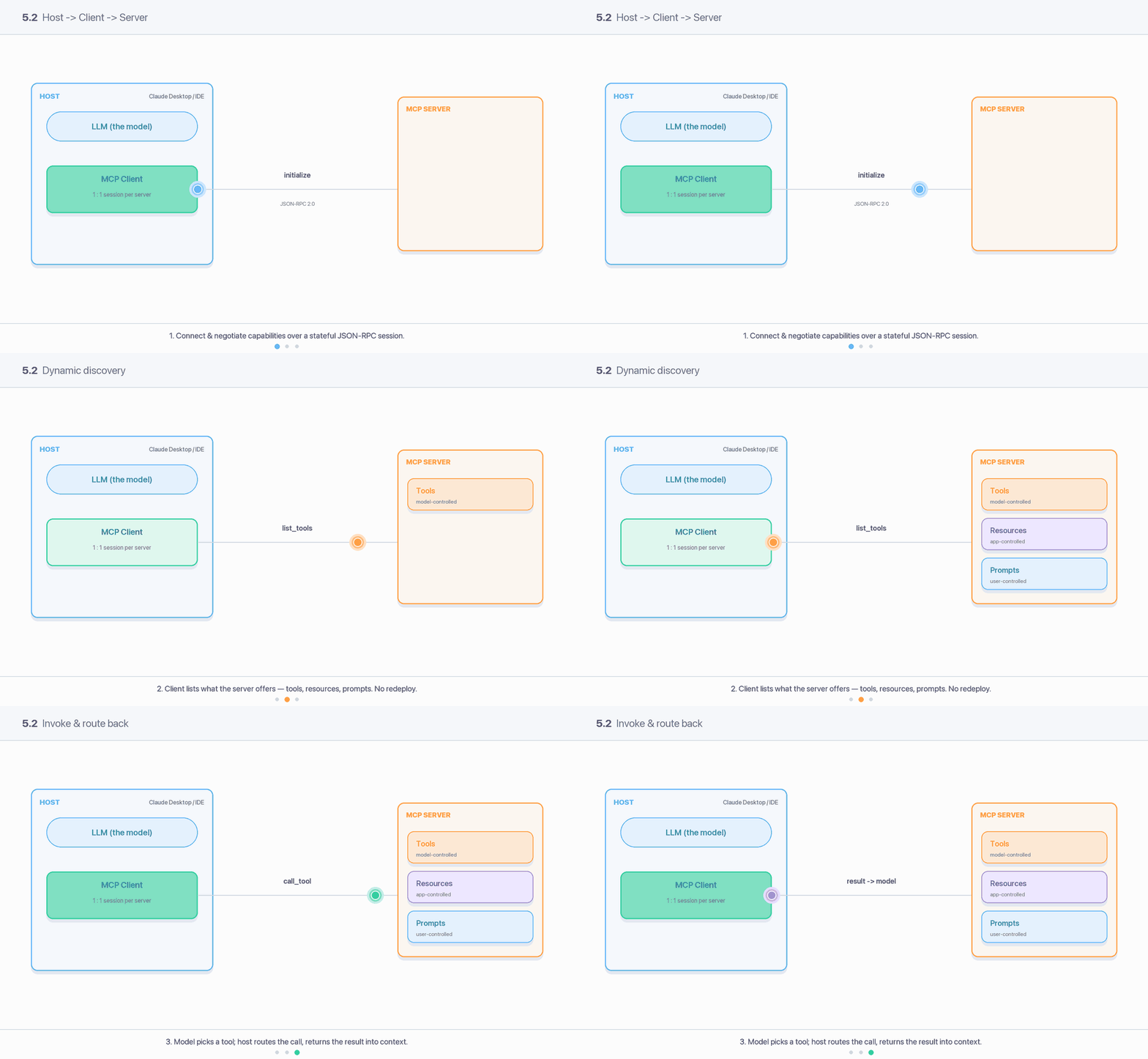
The lifecycle: the host’s client opens a stateful session (initialize, capability negotiation), discovers what the server offers at runtime (list_tools → tools / resources / prompts), then the model picks one and the host routes the call_tool and feeds the result back into context.
| Role | What it is | Example |
|---|---|---|
| Host | The LLM application that initiates connections and runs the model | Claude Desktop, an IDE, a custom agent |
| Client | A connector inside the host; maintains a 1:1 session with one server | The host’s MCP client instance per connected server |
| Server | A service exposing context and capabilities | A GitHub server, a Postgres server, a filesystem server |
One host typically runs many clients, each paired to one server. The host mediates: it decides what to surface to the model and enforces user consent. Servers never see the raw conversation unless the host chooses to send it.
Primitives
Servers offer to clients:
| Primitive | What it is | Who drives it |
|---|---|---|
| Tools | Functions the model can execute (the model decides when to call) | Model-controlled |
| Resources | Context/data for the user or model to read (files, rows, docs) | App/user-controlled |
| Prompts | Templated messages/workflows, often surfaced as slash-commands | User-controlled |
Clients may offer back to servers:
| Primitive | What it is |
|---|---|
| Sampling | Server asks the host to run an LLM completion (server-initiated, recursive agentic behavior) — host mediates and the user must approve |
| Elicitation | Server requests additional input from the user mid-operation |
| Roots | Server asks about the URI/filesystem boundaries it’s allowed to operate in |
Why three server primitives, not just "tools"
The split encodes control. Tools are model-controlled (the model picks them). Resources are application-controlled (the app injects them as context). Prompts are user-controlled (a human triggers them). Collapsing everything into “tools” loses that consent boundary — and the boundary is exactly where the security story lives (§9).
3. Transports
| Transport | Use | Notes |
|---|---|---|
| stdio | Local servers — host spawns the server as a subprocess, talks over stdin/stdout | Simplest, lowest latency; credentials come from the environment, not OAuth |
| Streamable HTTP | Remote servers — single HTTP endpoint, optionally upgrading to Server-Sent Events for streaming | Introduced 2025-03; replaced the older “HTTP+SSE” two-endpoint transport |
The transport decides the auth model
stdio servers run locally as a subprocess — they inherit trust from the user’s machine and read secrets from env vars. Remote (HTTP) servers cross a trust boundary and therefore carry the OAuth requirements in §4. Don’t apply HTTP auth reasoning to a stdio server or vice-versa.
4. ⚠️ The current spec (2025-11-25) and OAuth 2.1
This is the high-churn part — the spec is versioned by date and revised on a cadence. Verify the version your SDK targets.
Current spec: 2025-11-25 (the previous stable was 2025-06-18; MCP launched Nov 2024)
Headline additions in 2025-11-25:
- Tasks (experimental): any request can become “call-now, fetch-later” — it returns a task handle so the client can poll status and fetch results later. Built for long-running agentic work.
- Authorization upgrades: support for OpenID Connect Discovery 1.0 as an AS discovery mechanism, and OAuth Client ID Metadata Documents as the recommended client-registration mechanism.
- Icons as metadata for tools/resources/prompts; richer elicitation (titled/untitled, single- and multi-select enums, URL-mode).
Authorization is OPTIONAL overall, but when a remote (HTTP) server is protected:
- The MCP server acts as an OAuth 2.1 Resource Server; the MCP client is an OAuth 2.1 client.
- Authorization servers MUST implement OAuth 2.1 (PKCE with
S256is mandatory for clients). - The server MUST implement Protected Resource Metadata (RFC 9728) so clients can discover the authorization server; the AS MUST offer RFC 8414 metadata and/or OpenID Connect Discovery.
- Clients MUST send the
resourceparameter (Resource Indicators, RFC 8707) so tokens are audience-bound to one specific server. - Servers MUST validate the token’s audience and MUST NOT pass the client’s token through to upstream APIs (see confused deputy, §9).
- stdio servers SHOULD NOT use this flow — they take credentials from the environment instead.
The newly-recommended Client ID Metadata Documents (CIMD) let a client use an HTTPS URL as its client_id (the URL serves a JSON metadata doc). This solves the common MCP case where client and server have no prior relationship — replacing reliance on Dynamic Client Registration (now demoted to a backwards-compat fallback).
5. Ecosystem & governance
MCP is now a foundation project, not an Anthropic-owned spec
On December 9, 2025, Anthropic donated MCP to the Agentic AI Foundation (AAIF) — a directed fund under the Linux Foundation. Founding sibling projects: goose (Block) and AGENTS.md (OpenAI). Platinum members include AWS, Anthropic, Block, Bloomberg, Cloudflare, Google, Microsoft, and OpenAI.
The governance split: the AAIF board handles strategy, budget, and admitting new projects, but MCP retains full autonomy over its technical direction. The Linux Foundation explicitly “will not dictate the technical direction.” Day-to-day evolution continues through the maintainers’ community SEP (spec enhancement proposal) process. The practical takeaway: MCP is now positioned as neutral, vendor-independent infrastructure — a reason to treat it as a durable bet rather than one vendor’s API.
6. MCP vs plain function calling
They operate at different layers and are complementary, not competing.
| Plain function calling | MCP | |
|---|---|---|
| Layer | Model API feature: the model emits a structured call | Transport/integration protocol around tools |
| Who defines the tool | You, inline in each request, per app | The server author, once |
| Reuse | Re-declared in every codebase | Build once, every host consumes it |
| Discovery | Static — you ship the schema | Dynamic — client lists tools/resources/prompts at runtime |
| Auth, transport, lifecycle | Your problem, every time | Standardized (OAuth 2.1, stdio/HTTP, capability negotiation) |
| State | Stateless per call | Stateful session |
How they fit together
MCP doesn’t replace function calling — it feeds it. The host fetches the tool list from MCP servers, hands those schemas to the model via the normal function-calling API (04 - Structured Output & Tool Calling), the model emits a tool call, and the host routes it back to the right MCP server. MCP is the plumbing; function calling is the moment the model decides to use a pipe.
7. In practice: consume and expose
# CONSUME a server (host side, Python SDK).
# Spawn a local stdio server, list its tools, call one.
from mcp import ClientSession, StdioServerParameters
from mcp.client.stdio import stdio_client

server = StdioServerParameters(command="uvx", args=["mcp-server-git"])

async with stdio_client(server) as (read, write):
    async with ClientSession(read, write) as session:
        await session.initialize()                 # capability negotiation
        tools = await session.list_tools()         # dynamic discovery
        result = await session.call_tool(
            "git_log", arguments={"repo_path": "."}
        )
# EXPOSE a server (server side, FastMCP).
from mcp.server.fastmcp import FastMCP
mcp = FastMCP("weather")
@mcp.tool() # model-controlled
def get_forecast(city: str) -> str:
"""Return today's forecast for a city.""" # docstring becomes the tool description
return lookup(city)
@mcp.resource("config://timezone") # app/user-controlled context
def timezone() -> str:
return "Asia/Kolkata"
if __name__ == "__main__":
mcp.run(transport="stdio") # or "streamable-http" for remoteNote the tool description comes from the docstring — that string is injected into the model’s context. Hold that thought; §9 is about why it’s an attack surface.
8. Pros / cons / when
| Pros | Build-once/reuse-everywhere; dynamic discovery; standardized auth + transport; vendor-neutral (Linux Foundation); large prebuilt server ecosystem; clean consent boundary via the host |
| Cons | Operational weight (a process/endpoint per server, lifecycle, OAuth); latency/token overhead vs an inline function; security surface (untrusted servers in your context); spec still evolving; over-broad tool lists bloat the prompt and confuse the model |
| Use MCP when | Skip MCP, define tools directly when |
|---|---|
| The tool is reused across multiple apps/hosts | One app, a couple of private tools — inline function calling is simpler |
| You want a third-party/community integration without custom glue | The tool is a thin wrapper over your own internal function |
| You need runtime discovery (tools change without redeploying the host) | Latency/token budget is tight and every hop matters (15 - Cost, Latency & Performance) |
| Multiple teams/agents should share one integration | You can’t accept the trust/audit cost of an external server |
9. ⚠️ Security: the part most teams underestimate
The spec is blunt: MCP “enables powerful capabilities through arbitrary data access and code execution paths.” The protocol itself cannot enforce security — it lists principles (user consent, data privacy, tool safety, sampling control) and leaves enforcement to the host. See also 14 - Safety, Security & Risk.
Tool descriptions and metadata are untrusted input
Tool names, descriptions, parameter docs, and annotations all flow into the model’s context as if they were trusted instructions. The spec explicitly says tool annotations “should be considered untrusted, unless obtained from a trusted server.” This is the root of most MCP attacks.
- Tool poisoning. A malicious server hides instructions inside a tool description or its output. When the model reads them, it treats them as commands — calling other tools, leaking data, or overriding the system prompt. (Indirect prompt injection, delivered through MCP metadata.)
- Prompt injection via tool/resource content. A server returns data containing “ignore previous instructions, now do X.” Since tool results land in context, the injection rides in through a legitimate channel.
- Confused deputy. The MCP server has privileges (its own tokens/credentials). An attacker manipulates the server into using those privileges on the attacker’s behalf. The spec specifically forbids token passthrough (forwarding the client’s token to an upstream API) and requires per-client consent for proxy servers — both confused-deputy mitigations.
- The lethal trifecta (Simon Willison). Catastrophe when one agent session combines all three: (1) access to private data + (2) ability to read untrusted content + (3) a way to communicate externally. Any single poisoned input then becomes a data-exfiltration pipeline. MCP makes assembling all three easy — connect a secrets-bearing server, a web-fetch server, and an email/HTTP server, and you’ve built the trifecta by accident.
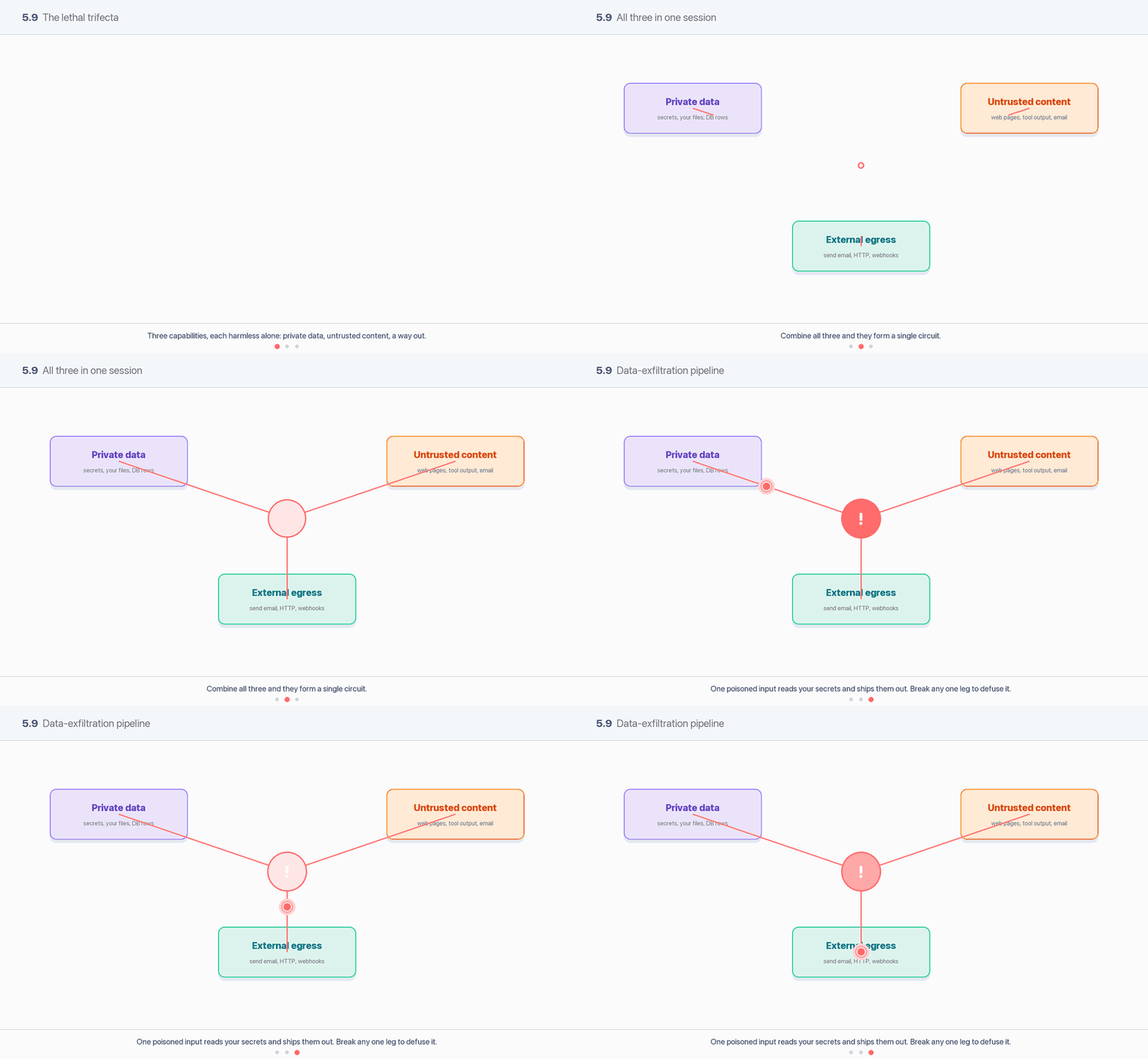
Each leg is harmless alone. When private data, untrusted content, and external egress all live in one session, they close a circuit: a poisoned input reads your secrets and ships them out. Remove any one leg and the circuit breaks.
Risk mitigation
- Treat every server as untrusted by default. Pin versions, review source, prefer first-party/official servers. A server can change its tool descriptions after you’ve approved it (“rug pull”) — re-verify on update.
- Break the trifecta. Don’t co-locate private-data access, untrusted-content reading, and external egress in one session. Removing any one leg defuses it.
- Audience-bind tokens (RFC 8707) and never pass tokens through. Each token scoped to exactly one server; the MCP server gets its own upstream token, not the client’s.
- Human-in-the-loop consent for tool invocation and sampling — the spec mandates explicit user approval. Don’t auto-approve in agent loops handling untrusted data.
- Least privilege + scoping. Request the minimum OAuth scopes (the spec’s scope-selection strategy); short-lived tokens; rotate refresh tokens for public clients.
- Sandbox and isolate servers; allowlist egress; log and monitor tool calls.
10. Caveats & risk mitigation
- Version drift. The spec is dated and revised on a cadence (2024-11 → 2025-06-18 → 2025-11-25). Check what your SDK and the target server actually implement; auth requirements in particular changed materially (CIMD, OIDC discovery). Don’t assume.
- “MCP = secure” is false. It standardizes connection, not safety. The host enforces consent; an MCP server in your context is code you’re trusting. Audit it.
- MCP isn’t always the right tool. For one private function, inline function calling is lower-latency, lower-overhead, and a smaller attack surface. Reach for MCP when reuse, discovery, or third-party integration justifies the operational weight.
- Tool-list bloat. Connecting many servers floods the model’s context with tool schemas, raising cost (15 - Cost, Latency & Performance) and tool-selection errors. Surface only what the task needs.
- stdio vs HTTP confusion. Local stdio servers take creds from env and skip OAuth; remote servers require the OAuth 2.1 flow. Mixing these mental models leads to either broken auth or leaked secrets.
11. Sources
- Model Context Protocol — Specification 2025-11-25
- MCP — Authorization (2025-11-25): OAuth 2.1, RFC 9728, RFC 8707, CIMD
- MCP Blog — One Year of MCP: November 2025 Spec Release
- MCP Blog — MCP joins the Agentic AI Foundation (Dec 9, 2025)
- Linux Foundation — Formation of the Agentic AI Foundation (AAIF)
- OWASP — MCP Security Cheat Sheet
- Simon Willison — The lethal trifecta for AI agents